The SQL Server LIKE operator is a logical operator that checks if a character string matches a specified pattern.
A pattern may include regular characters and wildcard characters. The LIKE operator is used in the WHERE clause of the SELECT, UPDATE, and DELETE statements to filter rows based on pattern matching.
The escape character instructs the LIKE operator to treat the wildcard characters as regular characters. The escape character has no default value and must be evaluated to only one character.
The LIKE operator returns TRUE if the column or expression matches the specified pattern.
To negate the result of the LIKE operator, you use the NOT operator as follows:
column | expression NOT LIKE pattern [ESCAPE escape_character]Code language:SQL (Structured Query Language)(sql)
2) Using the LIKE operator with the _ (underscore) wildcard example #
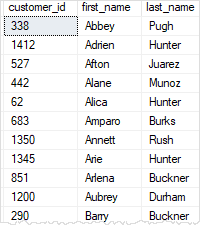
The underscore represents a single character. For example, the following statement returns the customers where the second character is the letter u:
SELECT
customer_id,
first_name,
last_name
FROM
sales.customers
WHERE
last_name LIKE'_u%'ORDERBY
first_name; Code language:SQL (Structured Query Language)(sql)
The pattern _u%
The first underscore character ( _) matches any single character.
The second letter u matches the letter u exactly.
The third character % matches any sequence of characters.
3) Using the LIKE operator with the [list of characters] wildcard example #
The square brackets with a list of characters e.g., [ABC] represents a single character that must be one of the characters specified in the list.
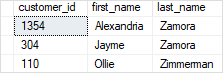
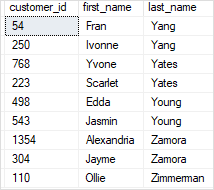
For example, the following query returns the customers where the first character in the last name is Y or Z:
SELECT
customer_id,
first_name,
last_name
FROM
sales.customers
WHERE
last_name LIKE'[YZ]%'ORDERBY
last_name;Code language:SQL (Structured Query Language)(sql)
4) Using the LIKE operator with the [character-character] wildcard example #
The square brackets with a character range e.g., [A-C] represent a single character that must be within a specified range.
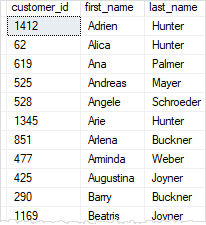
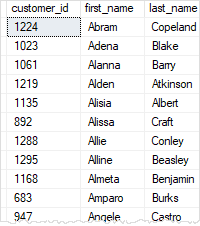
For example, the following query finds the customers where the first character in the last name is the letter in the range A through C:
SELECT
customer_id,
first_name,
last_name
FROM
sales.customers
WHERE
last_name LIKE'[A-C]%'ORDERBY
first_name;Code language:SQL (Structured Query Language)(sql)
5) Using the LIKE operator with the [^Character List or Range] wildcard example #
The square brackets with a caret sign (^) followed by a range e.g., [^A-C] or character list e.g., [ABC] represent a single character that is not in the specified range or character list.
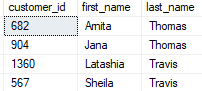
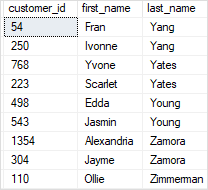
For example, the following query returns the customers where the first character in the last name is not the letter in the range A through X:
SELECT
customer_id,
first_name,
last_name
FROM
sales.customers
WHERE
last_name LIKE'[^A-X]%'ORDERBY
last_name;
Code language:SQL (Structured Query Language)(sql)
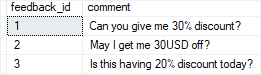
INSERTINTO sales.feedbacks(comment)
VALUES('Can you give me 30% discount?'),
('May I get me 30USD off?'),
('Is this having 20% discount today?');Code language:SQL (Structured Query Language)(sql)
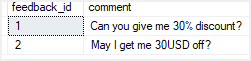
In this query, the ESCAPE clause specified that the character ! is the escape character.
It instructs the LIKE operator to treat the % character as a literal string instead of a wildcard. Note that without the ESCAPE clause, the query would return an empty result set.